Pen Mouse Comparison: Wireless Pen-Style Comfort and Control
By Maya Chen • 14th Sep
Quick verdict
The lychee Wireless Optical Pocket Pen Mouse is the better feature fit if you want replaceable AAA power and advertised DPI adjustment. Choose the lychee Rechargeable Pocket Pen Mouse if built-in charging, a stated stylus function, adapters, and a carry bag matter more. Neither is proven best for accuracy, writing, presentations, or wrist comfort.
- Choose the first option if: You prefer swapping an AAA battery and want a simple 2.4 GHz USB-receiver setup.
- Choose the alternative if: You prefer rechargeable power, left- or right-handed use, and the extra stylus and travel accessories.
- Main trade-off: The comparison is feature-based: there is no independent testing of tracking, handwriting, comfort, compatibility, or real battery life.
Important: Treat the listed handwriting, stylus, range, and battery claims as unverified until the mouse works reliably with your own devices and software.
This pen mouse comparison focuses on two pen-style options rather than trying to crown a universal winner. If your search terms include "wireless mouse mouse," the useful distinction is not marketing language: it is how you want to power the device, whether a stated stylus function and travel accessories matter, and whether the pen grip actually lets you work with less tension. Comfort first; speed shows up when pain steps aside.
The two models compared here are the lychee Wireless Optical Pocket Pen Mouse and the lychee Rechargeable Pocket Pen Mouse. Their listings establish feature differences, but there is no independent testing here for cursor latency, tracking precision, handwriting quality, click feel, long-session comfort, or real battery runtime. So treat this as a careful feature-based shortlist, not a lab performance ranking.
The short answer: which pen mouse fits which need?
- Choose the AAA-powered lychee Wireless Optical Pocket Pen Mouse if you prefer a replaceable battery and want listed adjustable DPI settings. It uses an optical sensor and a 2.4 GHz USB receiver.
- Choose the lychee Rechargeable Pocket Pen Mouse if you would rather recharge than carry an AAA cell and value the stated stylus function, carry bag, and included USB-C and Micro USB adapters.
- Do not choose either solely for wrist relief, serious drawing, competitive gaming, or critical handwriting work. Those outcomes require real fit and task testing, and the available information does not establish either model's comfort or precision in those scenarios.
For a pen-style input device, start neutral first, then speed: relaxed fingers, a quiet shoulder, and a wrist that is not bent hard up, down, or sideways.
At-a-glance feature comparison
| Decision point | lychee Wireless Optical Pocket Pen Mouse | lychee Rechargeable Pocket Pen Mouse |
|---|---|---|
| Power design | One 1.5 V AAA battery; battery is not included | Built-in 450 mAh lithium battery |
| Connection | 2.4 GHz USB receiver | Wireless operation is stated; connection details are not established here |
| Pointer setting | Listing advertises 800/1200/1600 DPI, though other text on the same listing conflicts | 1200 DPI listed as the default |
| Pen/writing claim | Listing describes a handwriting-input function that requires handwriting software | Listing advertises a stylus function and touch head |
| Handedness | No comparable handedness claim established here | Listed as suitable for right- and left-handed users |
| Included items | Mouse, USB receiver, mount, manual | Mouse, Type-C charging cable, USB-to-USB-C and Micro USB adapters, carry bag, user guide |
| Presentation claim | Listed for presentation use up to 10 m | Listing describes a 10 m presentation-control range; transmission is stated as up to 12 m in an interference-free environment |
The practical divide is simple: replaceable AAA power versus built-in recharging and a more complete travel bundle. For a deeper look at how receiver-based wireless compares with Bluetooth and wired connections, see this guide to wired versus wireless mice. Neither listing gives enough trustworthy detail to compare charge longevity, wake behavior, tracking consistency, or real-world range.
Option 1: AAA-powered pocket pen mouse
The lychee Wireless Optical Pocket Pen Mouse is the simpler of the pair on paper. It uses optical tracking with a 2.4 GHz USB receiver and takes one AAA battery. That can suit a travel kit where you prefer to swap power immediately rather than recharge between meetings.
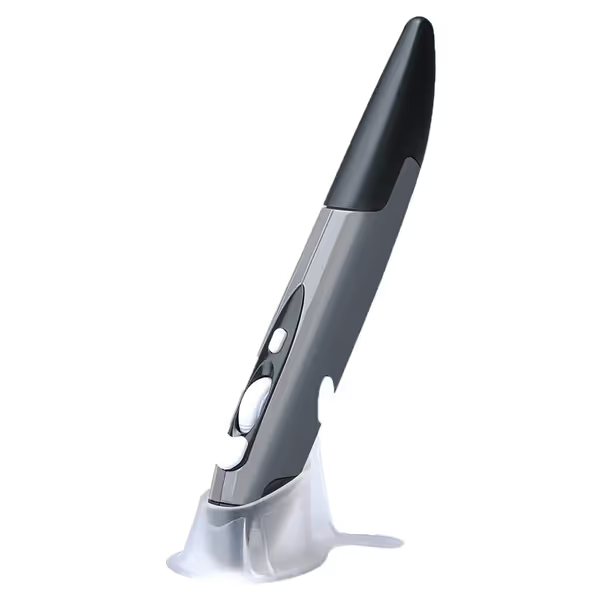
lychee Wireless Optical Pocket Pen Mouse
Ultra-portable pen mouse for comfortable use in limited spaces.
$11.98
Connectivity2.4GHz Wireless
Connectivity2.4GHz Wireless
Pros
Reduces wrist strain with natural pen-grip ergonomics
Extremely portable for on-the-go use
Cons
Plastic construction feels fragile, especially the switch
Customers appreciate its ergonomic design, finding it comfortable and easy to use, especially for those with wrist issues. Some note that the plastic construction, particularly the on/off switch, feels fragile, and it lacks a middle-mouse wheel click.
Customers appreciate its ergonomic design, finding it comfortable and easy to use, especially for those with wrist issues. Some note that the plastic construction, particularly the on/off switch, feels fragile, and it lacks a middle-mouse wheel click.
Its listing also describes handwriting input, with an instruction to download and select handwriting software. That is an important limitation to understand: the mouse itself is not evidence that your handwriting will be recognized accurately, nor does the information establish which apps or devices will behave well. Think of it as a pointer shaped like a pen, with a claimed handwriting workflow, not a verified replacement for a dedicated drawing or handwriting tool.
For cursor speed, the listing advertises 800, 1200, and 1600 DPI. However, another part of that same listing shows a different set of settings. I would not buy this model for a precise DPI requirement. Instead, treat the listed adjustment as a convenience feature and test the speed in your usual documents or slides during the return window.
Who should lean toward it?
Consider this model when these conditions matter most:
- You want AAA-based power rather than a built-in battery.
- You are controlling slides or navigating basic desktop tasks from a USB-receiver-equipped computer.
- You want the option to try the listing's handwriting-input workflow with your own software.
- You need a very compact device and can accept that the published size information is inconsistent across the listing.
For a pen mouse for presentations, the stated 10 m range is useful as a planning reference, not a promise. Rehearse the exact setup before the event.
Option 2: rechargeable pen mouse with stated stylus function
The lychee Rechargeable Pocket Pen Mouse changes the ownership routine more than the core concept. It has a built-in 450 mAh lithium battery and includes a Type-C charging cable. Its package also includes adapters for USB-C and Micro USB plus a carry bag.
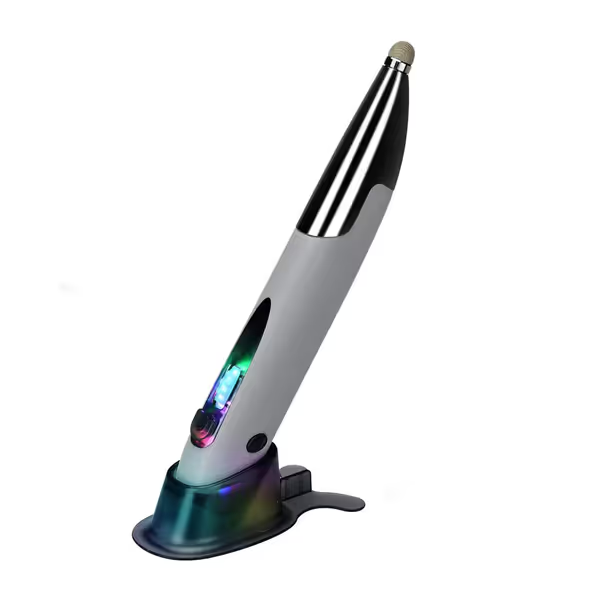
Lychee Rechargeable Pocket Pen Mouse
Ultra-portable pen mouse for comfortable use in any setting.
$18.98
Battery Life1 Month (per charge)
Battery Life1 Month (per charge)
Pros
Ergonomic pen design reduces strain in limited spaces
Left/right-handed compatibility for broader appeal
Cons
Pen mouse style may not suit all grip preferences
The listing calls out a stylus function and describes a touch head for different platforms. That may make it the more attractive pick for someone specifically seeking a handwriting pen mouse or touch-screen-adjacent tool. Still, the available information does not test the tip's precision, pressure sensitivity, palm rejection, or behavior in particular tablet apps. If writing is the whole reason you are buying, those unknowns are not minor details.
The product is also listed as usable by both right- and left-handed people. For left-handed users especially, that is a welcome stated design intention, but it is not a substitute for checking button reach. With a pen grip, the relevant question is whether you can click without squeezing, twisting the forearm, or lifting your shoulder.
The retailer claims a full charge can last one month, but gives no usage pattern or test method. Avoid treating that as a predictable runtime. Once you know your usage pattern, these wireless mouse battery-saving tips can help extend time between charges. Charge it before a travel day or presentation, and keep the cable in the carry bag until you understand your own usage pattern.
Who should lean toward it?
This is the more logical feature fit if you want:
- A built-in rechargeable battery rather than AAA replacement.
- A stated stylus function to explore alongside normal pointer control.
- A carry bag and included adapters for a mobile kit.
- A listing that explicitly says it suits both left- and right-handed users.
Comfort and control: assess the grip, not the promise
A pen-shaped mouse can change the way you hold an input device, but it is not automatically an ergonomic solution. An upright hand-and-wrist posture is often discussed in this ergonomic mouse guide as a way to reduce muscle strain, yet that general principle does not prove that either pen mouse creates a neutral posture for your hand or resolves symptoms.
Early in my design career, I learned this the practical way: a low, narrow shell had my wrist burning by lunch until I stopped treating "small" as "efficient" and started checking where my hand was actually making contact. A taller, gently angled shape changed the load path, and my shoulder stopped doing so much hidden work. The lesson applies here: a pen grip should earn its place through calm, repeatable movement.
Use this two-minute fit check
Before committing to a pen-style mouse, hold it as you would during a real task and assess the following: Your natural mouse grip style also matters, because a pen shape may feel different under palm, claw, or fingertip control.
- Wrist line: Can your wrist stay roughly in line with your forearm? Do not force it into a rigid pose; simply avoid a sustained sharp bend.
- Finger pressure: Can the thumb, index finger, and middle finger guide the device without pinching? Whitening fingertips or a cramped thumb are stop signs.
- Shoulder behavior: Move the cursor across a document. If your shoulder hikes toward your ear, bring the work closer or change the device position.
- Control test: Select small text, drag a file, scroll a page, and advance slides. A comfortable grip that cannot reliably complete your actual task is not the right fit.
- Time test: Check again after 20 to 30 minutes. First impressions are often generous; fatigue is more honest.
A pen mouse can be particularly appealing where desk space is limited or a conventional mouse is awkward to place. But avoid extreme grip hacks: no death grip, no locked wrist, no trying to steer entirely from the fingertips for hours. Move from the forearm and shoulder as needed, keep the device close, and take short movement breaks before discomfort escalates.
What these models are, and are not, well positioned to do
Reasonable use cases to test
The AAA model is a pen-style optical mouse with a USB-receiver-based connection. The rechargeable model is listed as a wireless optical pen mouse. Their stated feature sets make them plausible candidates for:
- Basic cursor navigation on a compatible computer.
- Slide advancement or simple presentation control after a venue rehearsal.
- Occasional, portable use where a pen-like form factor is easier to pack than a full mouse.
- Trying a software-supported handwriting or stylus workflow, with expectations kept modest until tested.
Workflows that need more proof before purchase
There is no basis here to call either the best pen style mouse for any of these:
- Competitive FPS aim or other latency-sensitive gaming.
- Detailed illustration, CAD, or pressure-sensitive stylus work.
- High-volume spreadsheet work requiring a known scroll-wheel feel.
- Mission-critical presentations where receiver reliability has not been rehearsed.
- All-day pain management or any medical condition.
That is not a dismissal of the category. It is a reminder to map the device to the workload. A small pen mouse may be a clever second input device for travel, yet a poor primary tool for eight uninterrupted hours of precision work.
Buying decision: pick the power and accessory model that reduces friction
This mini pen mouse review comes down to a feature-led call:
- Pick the AAA model when replaceable battery power and advertised speed adjustment are your priorities.
- Pick the rechargeable model when you prefer charging, want the stated stylus function, or will benefit from the carry bag and port adapters.
Neither is proven "best" overall, because the most important performance and comfort questions have not been independently measured. Your best outcome comes from a short, deliberate trial: use it for one real document, one slide deck, and one 20-minute navigation session; then check accuracy, grip force, shoulder tension, and whether the receiver setup fits your devices.
FAQ
Is there a mouse that works like a pen?
Yes. Both models here are listed as pen-style optical mice. The AAA-powered version is advertised with handwriting input that relies on separate handwriting software, while the rechargeable version is advertised with a stylus function. Those claims do not establish writing quality or app-specific compatibility, so test the exact workflow you plan to use.
What is the best pen mouse for writing?
There is not enough tested evidence to name one. The rechargeable model has a stated stylus function, and the AAA model has a stated handwriting-input function, but neither has validated results for handwriting recognition, tip accuracy, or writing comfort. For writing, prioritize a return-friendly trial and test your actual software first.
How do I connect these wireless pen mice?
The AAA model is listed with a 2.4 GHz USB receiver. The rechargeable model includes adapters. Because complete setup instructions and device-specific compatibility testing are not established here, use the included guide and confirm that your computer has a workable connection before relying on either mouse.
Your next step
Write down the one task you need the pen mouse to solve: slide control, portable cursor work, or a handwriting experiment. Then choose AAA simplicity or rechargeable accessories, and run the two-minute fit check on day one. Keep the grip easy, keep the wrist quiet, and give yourself microbreaks. That is how a small input device supports sustainable control instead of adding another source of strain.
Related Articles