Best Mouse for Chromebook: Wireless Comfort Without Lag
By Amara Okoye • 10th Sep

Quick verdict
For most Chromebook users, start with the Logitech Signature M650: it has the strongest Chromebook-specific compatibility evidence and offers Bluetooth Low Energy or receiver connectivity. Choose UGREEN for a broader, full-size receiver-based shape, or SHUNJINRUN for compact travel use and an explicitly USB-A receiver.
- Choose the first option if: You prioritize Chromebook-focused support, Bluetooth flexibility, a small-to-medium fit, or lower reported click noise. View on Amazon
- Choose the alternative if: UGREEN suits a larger palm-supporting shell; SHUNJINRUN suits a flat, portable design and your Chromebook accepts USB-A or an adapter.
- Main trade-off: The comparison supports fit and compatibility decisions, not a lag ranking. No collected evidence measures latency, dropouts, or connection reliability.
Important: UGREEN and SHUNJINRUN compatibility, quietness, comfort, and battery claims come from retailer or manufacturer listings rather than independent testing.
Finding the best mouse for Chromebook is less about chasing an impressive specification list and more about matching the connection method, shell geometry, and your actual hand measurements. A good Chromebook wireless mouse should fit your hand without forcing grip pressure, suit the ports you have available, and offer Chromebook compatibility evidence that is stronger than a vague "works with laptops" label. One important limitation: none of the available evidence measures latency, polling stability, dropouts, or Bluetooth delay for the models below. So this is a fit and compatibility comparison, not a claim that any mouse is proven lag free.
Measure first; the right shape changes everything that follows.
I learned this the slow way after switching mice based on reviews alone. Once I began comparing hand length, width, fingertip reach, and where a shell supports the palm, the right shape stopped drawing attention to itself. That is the standard to pursue here: measure, then match.
Step 1: Start With Chromebook Connection Requirements
Before comparing shapes, establish what your Chromebook can physically accommodate and what connection style you prefer. This prevents the most avoidable return: buying a receiver based mouse without planning for its receiver.
Choose between Bluetooth and a wireless receiver
The three models differ most clearly here:
| Mouse | Reported connection method | What to verify before purchase |
|---|---|---|
| Logitech Signature M650 | Bluetooth Low Energy or Logi Bolt USB receiver | The product page does not specify the receiver's connector type. |
| UGREEN Wireless Mouse | 2.4G operation through a USB receiver | The product page notes a USB receiver but does not specify its connector type or confirm Bluetooth support. |
| SHUNJINRUN Slim Silent | 2.4 GHz operation through a USB-A nano receiver | A USB-C only Chromebook requires a USB-C to USB-A adapter, per the listing. |
This is an interface and connection decision, not a performance ranking. A receiver and Bluetooth connection can each be appropriate, but the evidence here does not compare their responsiveness or reliability. If low perceived delay is essential to your work or play, do not treat a connection label alone as proof of latency performance.
Treat compatibility language at the right confidence level
The Logitech Signature M650 has the clearest Chromebook specific support in this group: Logitech lists the Signature M650 in its Works With Chromebook device list. The specific small to medium, black configuration discussed here is a retailer listed variant within that product line.
The UGREEN and SHUNJINRUN listings each claim ChromeOS and Chromebook compatibility. Those are useful buying signals, but they are manufacturer claims shown on retailer pages, not Chromebook certification. This distinction matters if you need the highest available confidence before purchasing.
Step 2: Measure Your Hand Before Choosing a Shell
Do not choose from a hand photo, and do not let a generic "ergonomic" label overrule discomfort. Use a repeatable protocol instead.
- Hand length: Place your dominant hand flat. Measure from the wrist crease to the tip of the middle finger.
- Hand width: Measure across the widest part of the palm, excluding the thumb.
- Fingertip reach: With your hand in its relaxed mousing posture, note whether your fingertips naturally fall near the primary buttons or must stretch forward.
- Grip observation: Identify what happens after 20 minutes of ordinary use. Does your palm rest on the shell, does it hover in a claw like arch, or do only the fingertips contact the mouse?
The practical goal is simple: your fingers should reach the buttons without sliding your hand forward, while your thumb should not have to clamp the sidewall to stabilize the mouse. Palm coverage is not automatically better. A compact mouse can work beautifully for a relaxed fingertip or light claw grip, while a broader shell may better support a hand that naturally rests more fully on the mouse.
Use discomfort as decision grade evidence
If an existing mouse causes numbness, wrist strain, or persistent forearm tension, regard that as a shape mismatch signal, not a challenge to overcome with tighter grip or more adaptation time; an ergonomic mouse comparison can help you evaluate alternative shapes. I have medium small hands and tend to prefer narrower, ambidextrous shapes, so I am especially careful not to project that preference onto larger handed readers. Your measurements and comfort response take priority.
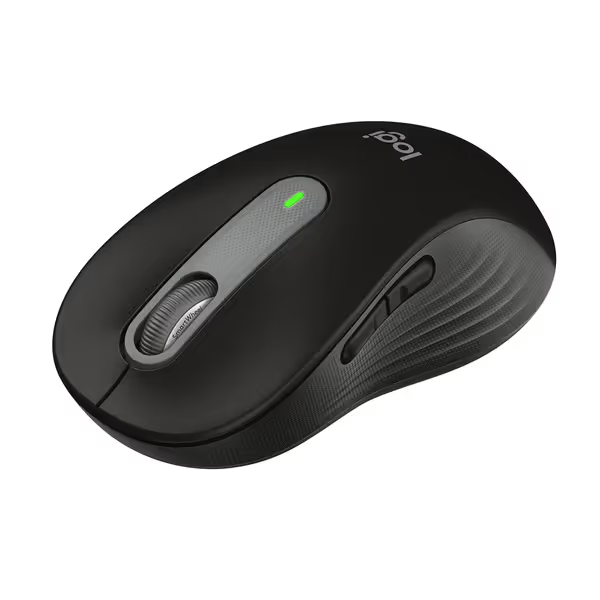
Logitech Signature M650 Wireless Mouse
Comfortable, quiet, and versatile mouse for small to medium hands.
$39.99
Battery Life24 Months
Battery Life24 Months
Pros
Silent clicks & SmartWheel for precise or fast scrolling
Ergonomic design with soft thumb rest and rubber grips
Cons
May be too small for larger hands
Customers praise its quiet clicks, smooth operation, and versatile connectivity.
Customers praise its quiet clicks, smooth operation, and versatile connectivity.
Step 3: Select the Mouse That Matches Your Primary Use
Option A: Logitech Signature M650 - strongest Chromebook specific compatibility evidence
The Logitech Signature M650 is the most straightforward choice when official Chromebook focused listing matters most. Logitech includes the M650 family in its Works With Chromebook selection, and the exact retailer configuration reports both Bluetooth Low Energy and a Logi Bolt receiver option.
For fit, the retailer listing identifies this specific configuration as small to medium and describes a soft thumb area and rubber side grips. That makes it the relevant candidate if your measurements point toward a narrower shell rather than a broad full size body. Logitech's listing also describes size and handedness options within the M650 range, but evaluate the precise configuration you are buying rather than assuming every version shares the same fit.
It is also the strongest candidate for a reader specifically seeking a silent Chromebook mouse. The listing reports SilentTouch technology and claims 90% less click noise. That is a manufacturer claim reproduced by the retailer, not an independent sound measurement, but it is relevant if shared offices, classrooms, or late night work make click noise a selection criterion.
Battery management is another practical advantage on paper: the listing reports up to 24 months from one AA battery, while noting that usage and computing conditions affect battery life. The appropriate interpretation is potential convenience, not a guaranteed two year result.
Choose the M650 when:
- You want the strongest available Chromebook specific compatibility evidence.
- You prefer the option of Bluetooth Low Energy or a receiver.
- Your hand measurements suit a small to medium mouse.
- Lower reported click noise is a priority.
Pause before choosing it when:
- You require confirmation of the receiver connector type for your particular Chromebook.
- Your hand needs a full size, broad palm shell.
- You need measured latency results rather than feature claims.
Step 4: Consider a Full Size Receiver Based Shape for Palm Support
The UGREEN Wireless Mouse takes a different approach. Its product page identifies 2.4G wireless operation via a stored USB receiver and claims ChromeOS/Chromebook compatibility. It does not establish Bluetooth support for this exact configuration, so it should not be purchased as a Chromebook Bluetooth mouse.
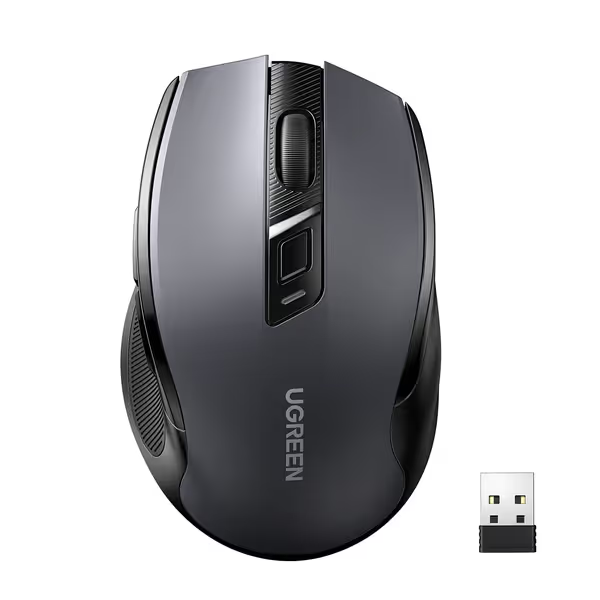
UGREEN Wireless Mouse 2.4G
Ergonomic comfort and silent clicks for pain-free, productive work.
$9.49
Battery Life18 Months
Battery Life18 Months
Pros
Sculpted shape reduces hand and wrist strain
Near-silent clicks for quiet environments
Cons
Scroll wheel can be loud and inconsistent
Customers praise its smooth, reliable, and comfortable feel, noting the long-lasting battery, though some find the scroll wheel loud.
Customers praise its smooth, reliable, and comfortable feel, noting the long-lasting battery, though some find the scroll wheel loud.
The listing describes a full size ergonomic design with soft rubber grips, a broad palm area, and sculpted sides. That may be a sensible direction for someone whose current compact mouse leaves part of the palm unsupported or encourages finger curling. It is not evidence that the shell will reduce strain for every hand; comfort remains individual, and a broad palm platform can be too large for short hands or a fingertip led grip.
The UGREEN listing reports five DPI settings: 800, 1200, 1600, 2400, and 4000. Treat these as available sensitivity choices, not proof of tracking quality or gaming suitability. No evidence here evaluates sensor behavior, input lag, or accuracy.
For quiet work, the retailer listing claims a 90% reduction in click sound. As with the M650, that is not independently measured for this exact mouse. It does, however, make the model worth considering when low click noise and a larger claimed support area are more important than Bluetooth connectivity.
The listing also reports up to 18 months of battery life from one AA battery, which is not included. Actual runtime cannot be predicted from the claim alone.
Choose the UGREEN when:
- You want a receiver based mouse and have confirmed your Chromebook can accommodate the receiver.
- A broader, full size shell better matches your palm width and grip.
- You value the listed DPI steps and extra physical controls.
- You want a low noise design claim without needing Bluetooth.
Pause before choosing it when:
- You need Bluetooth rather than a receiver.
- You have smaller hands or commonly find wide shells fatiguing.
- You need independently tested connection or click noise performance.
Step 5: Prioritize Packability Only After Fit Is Solved
A portable Chromebook mouse is useful when the mouse must live in a laptop sleeve or small bag, but portability creates a familiar ergonomic trade off: reduced shell volume can mean reduced palm support. The SHUNJINRUN Slim Silent 2.4G Wireless Optical Mouse is the compact option in this comparison.
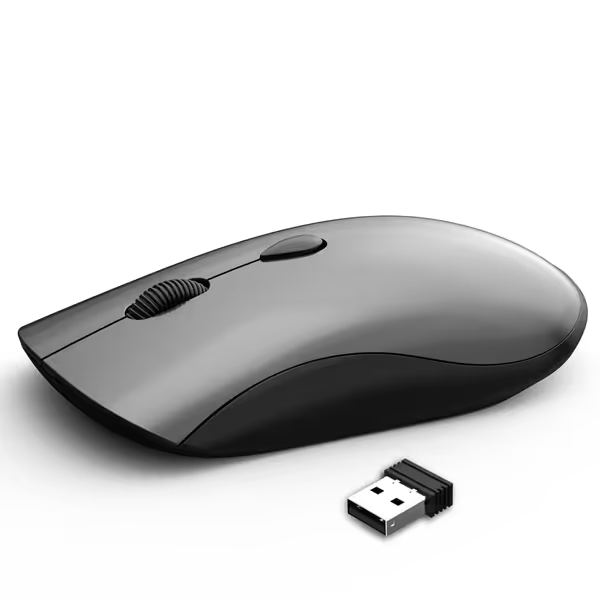
SHUNJINRUN Slim Silent 2.4G Wireless Optical Mouse
Quiet, portable, and ambidextrous for comfortable, distraction-free productivity on the go.
$12.96
Connectivity2.4GHz Wireless (USB-A Receiver)
Connectivity2.4GHz Wireless (USB-A Receiver)
Pros
Silent clicks prevent disturbance in shared spaces
Slim, portable design fits easily in any bag
Cons
Requires AA battery (not included)
Customers praise its easy setup, quiet clicks, and comfortable, trim design, noting its immediate functionality.
Customers praise its easy setup, quiet clicks, and comfortable, trim design, noting its immediate functionality.
Its retailer listing gives approximate dimensions of 4.5 × 2.4 × 1.1 inches and describes a flat, bag friendly form. The flat form may suit users who prefer a lower-profile mouse, but your own grip still decides whether it is comfortable for the tasks you do.
Connection is explicitly through a 2.4 GHz USB-A nano receiver. This is the one model for which the listing directly states the adapter requirement for USB-C only devices: plan on a USB-C to USB-A adapter in that case. The listing claims ChromeOS and Chromebook compatibility for devices with a USB port.
The "Slim Silent" name aligns with the retailer's description of soundless left and right buttons. There is no measured sound level, so treat it as a design claim rather than a verified decibel comparison. Similarly, the listing says the mouse uses one AA battery and enters sleep mode after 10 minutes of inactivity, but does not provide a total battery life estimate.
Choose the SHUNJINRUN when:
- Packability is central to your routine.
- You prefer a flat shell.
- Your Chromebook can accept its USB-A receiver or you are prepared to use an adapter.
- Quiet primary button operation is desirable.
Pause before choosing it when:
- You need substantial palm support through long work sessions.
- You want Bluetooth connectivity.
- You need a numerical battery life expectation before buying.
Step 6: Make the Final Comparison Without Overclaiming "Lag"
Here is the shortest defensible path to a decision.
| If your priority is… | Start with… | Why |
|---|---|---|
| Official Chromebook oriented compatibility evidence | Logitech Signature M650 | Logitech lists the M650 family among Works With Chromebook devices. |
| Bluetooth as an available connection option | Logitech Signature M650 | Its exact retailer listing reports Bluetooth Low Energy. |
| A broad, full size ergonomic form | UGREEN Wireless Mouse | Its listing describes a broad palm area, rubber grips, and sculpted sides. |
| Compact travel dimensions | SHUNJINRUN Slim Silent | Its listing reports a flat 4.5 × 2.4 × 1.1 inch form factor. |
| Explicit USB-A receiver information | SHUNJINRUN Slim Silent | Its listing identifies a USB-A receiver and notes the USB-C adapter requirement. |
| Quiet click claims | M650, UGREEN, or SHUNJINRUN | All three have retailer reported low noise or silent button claims; none has an independent comparison here. |
There is no evidence supported single winner for every Chromebook user. The M650 is the most defensible starting point where Chromebook specific compatibility confidence and Bluetooth flexibility matter. The UGREEN is the directional pick for users whose measurements call for a larger palm supporting shell and who are committed to receiver based operation. The SHUNJINRUN is the directional pick for compact carry, provided its flatter shape fits your grip and its USB-A receiver arrangement works for your device.
FAQ
Can a mouse be used on a Chromebook?
The models compared here each have Chromebook or ChromeOS compatibility support in their available product information. Logitech lists the Signature M650 family among Works With Chromebook devices; the UGREEN and SHUNJINRUN retailer listings claim ChromeOS and Chromebook compatibility. That supports these specific choices, not a universal claim about every mouse.
Can I use a wireless mouse on a Chromebook?
Yes, the three wireless models discussed here are presented as Chromebook or ChromeOS compatible in their available product information. Check the connection route before buying: the M650 listing reports Bluetooth Low Energy and a receiver option, while the UGREEN and SHUNJINRUN listings describe receiver based operation.
Continue Your Fit Check Before You Buy
The best next step is not another ranking, it is a two minute measurement and port audit. Record hand length and width, name your natural grip, inspect whether your Chromebook needs an adapter for a receiver, then compare those answers against the shell and connection requirements above. That small procedure turns a broad search for the best mouse for Chromebook into a specific, defensible match, and makes comfort the first filter rather than an expensive afterthought.
Related Articles