Best Vertical Mouse for Large Hands: Size, Shape, Control
By Lars Nystrom • 3rd Oct
At a glance
For large hands, the SHARE SUNSHINE Large Wireless Mouse for Big Hands is the only model here marketed for that fit, while the MicroPack MP-V03W is explicitly listed for small-to-medium hands.
- Best overall: Treat the SHARE SUNSHINE as the conditional first option, not a proven best: confirm palm support, relaxed button reach, natural thumb access, and no pinky pinch. View on Amazon
- Alternative use case: Choose the MicroPack only if your hands are small to medium and you value USB-A/USB-C receivers and AA-battery power; its stated fit range conflicts with this guide’s large-hand focus.
- What decides it: Prioritize shell volume, rear-palm support, thumb-rest geometry, and control reach over DPI or button count.
Important: “Designed for big hands” is a retailer or manufacturer claim for the SHARE SUNSHINE, not a conclusion supported by measured dimensions or independent testing.
A large hand vertical mouse should solve a reach problem before it tries to solve a spec-sheet problem. If your palm hangs off the rear, your pinky has to clamp the outside edge, or your thumb has to search for side controls, more DPI will not make the mouse feel right. For anyone trying to identify the best mouse for large hands, the useful order is simple: establish palm support, test control reach, then compare connection and power choices. For a more precise starting point, use this hand-size and grip measurement guide before comparing mouse dimensions.
That approach matters because vertical mice are unusually sensitive to geometry. A model can look substantial in a listing yet still put the scroll wheel, primary buttons, or thumb controls in the wrong place for your hand. The two wireless models compared here illustrate the problem clearly: one is explicitly positioned for small-to-medium hands, while the other is marketed for big hands but lacks the measurements needed to independently confirm its fit. A broader vertical mouse comparison can help you evaluate how different angles, shells, and price points affect that fit decision.
Map intent to buttons; your mouse becomes muscle memory.
The short answer: the large-hand choice is conditional
Of these two models, the SHARE SUNSHINE Large Wireless Mouse for Big Hands is the only one marketed specifically for large hands. It is therefore the relevant model to investigate if you want a vertical mouse for large hands. But "designed for big hands" is a seller claim, not a measurement. Its available information does not establish shell height, palm-contact area, thumb-rest shape, or side-button reach.
The MicroPack MP-V03W is not a large-hand recommendation. Its own listing says it is intended for small-to-medium-sized hands. It may have useful connectivity for the right person, but it starts with the wrong fit target for this guide.
So there is no defensible universal winner here. There is a sensible buying path: shortlist the SHARE SUNSHINE only if you can verify fit or return it easily; rule out the MicroPack when large-hand comfort is the requirement.
What "large-hand fit" actually means
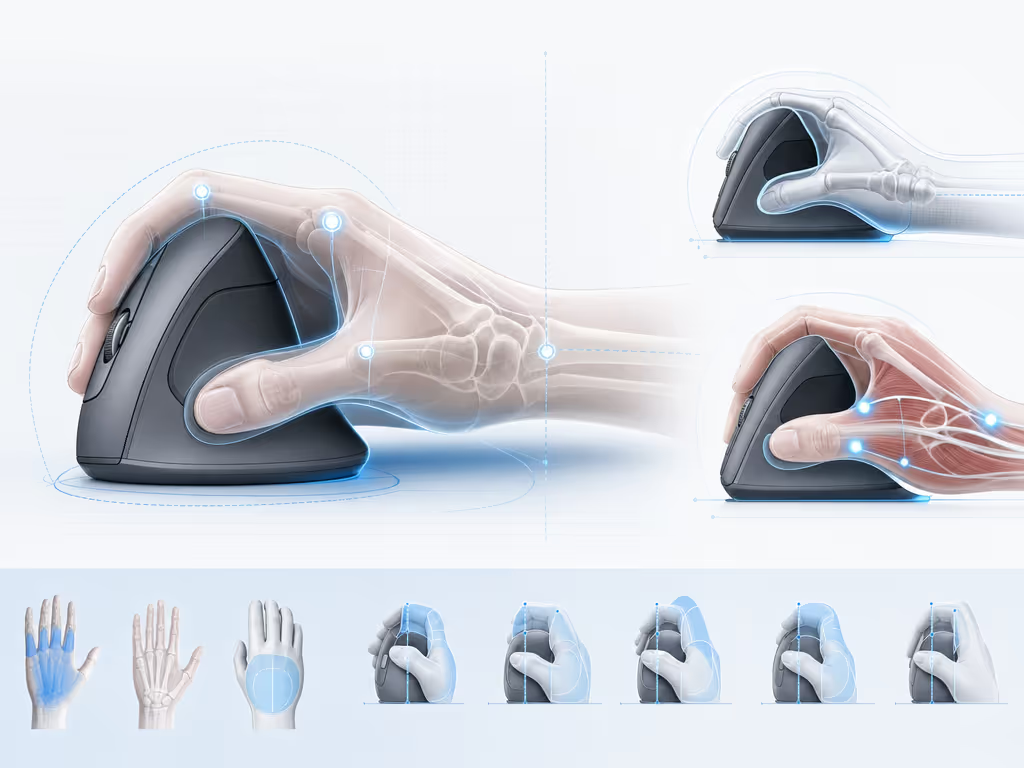
A good palm fit mouse is not simply a long mouse. For large hands, it has to let the hand settle without turning control into a series of compensations. Use these four checkpoints.
1. Palm support comes before sensitivity settings
Large-handed palm-grip users generally need enough rear-shell volume to rest the back of the palm or the whole palm. These choices also reflect the broader principles of neutral mouse posture and ergonomic design, not just product dimensions. A fuller, curvier shape is often more appropriate for this grip than a low or narrow body that leaves the hand suspended.
This is the first filter because it determines how much force you use to hold the mouse in place. If you have to maintain a partial claw merely to keep contact, the mouse is asking your hand to do extra work throughout the day.
2. Primary controls must sit under relaxed fingers
Your index and middle fingers should reach the primary buttons and scroll wheel comfortably. Do not judge this only in the first minute. Move through a normal cycle: scroll, click, drag, select, and return to the wheel. If your fingers straighten or curl hard to find a control, the shape is not working with your hand.
3. The thumb cluster should be natural, not merely present
For a workflow mouse, side buttons count only when they are easy to use without shifting your grip. A natural thumb reach to side controls is a better test than button count. This is where many vertical designs either reduce decisions, increase flow, or create a new interruption every time you navigate back, switch tools, or invoke a shortcut.
I learned this while moving daily between a design tablet, macOS shortcuts, and Windows CAD hotkeys. A sane thumb cluster and consistent layers across machines removed far more mental drag than adding another sensitivity step ever did.
4. Watch for pinky pinch
A too-narrow vertical shell can make the pinky reach around to stabilize the right side. That grip demand is a useful red flag. Your pinky may rest on the desk; it should not need to become a clamp just to keep the mouse under control.
Comparative analysis: fit, controls, and everyday friction
At-a-glance comparison
| Decision point | SHARE SUNSHINE Large Wireless Mouse for Big Hands | MicroPack MP-V03W |
|---|---|---|
| Stated hand-size target | Marketed for big/large hands | Marketed for small-to-medium hands |
| Hand orientation | Right hand | Not established as a large-hand fit |
| Wireless setup | Radio/USB wireless [ | USB-A and USB-C wireless receivers |
| Power approach | Rechargeable via USB-C | One AA battery |
| Stated DPI steps | 800 / 1200 / 1600 / 2400 / 3600 | 800 / 1200 / 1600 |
| Stated button count | 6 | 6 |
| Quiet-click claim | Yes | Not established |
| Key fit limitation | No verified physical fit measurements | Advertised size range conflicts with large-hand use |
The table deliberately does not use DPI or button count as a fit score. Everyday vertical-mouse fit is shaped more by the rear-shell curve, thumb-rest height, and whether the pinky is pinched than by raw sensitivity numbers.
SHARE SUNSHINE Large Wireless Mouse for Big Hands: the only relevant candidate
The SHARE SUNSHINE model is a right-handed, wireless vertical mouse sold as being designed for big hands. Its listed features include six buttons, silent-click buttons, blue LED lighting, five DPI settings from 800 to 3600 DPI, and rechargeable USB-C power.
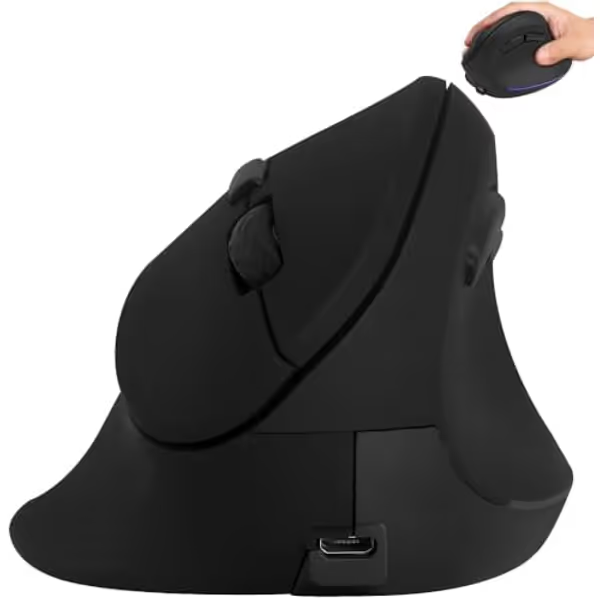
Ergonomic Vertical Mouse for Large Hands
Ergonomic vertical mouse for large hands reduces strain and improves comfort.
DPI Range800-3600 Adjustable
DPI Range800-3600 Adjustable
Pros
Specifically designed for large hands, enhancing comfort.
Promotes natural hand position to reduce strain.
Cons
Some users report intermittent stopping or slow motion sensor issues.
Customers praise its comfort and ergonomic design for larger hands, though some note intermittent stopping or slow sensor issues.
Customers praise its comfort and ergonomic design for larger hands, though some note intermittent stopping or slow sensor issues.
For a large-hand buyer, that big-hand positioning makes it the logical first option in this comparison. If you are open to non-vertical shapes, compare it with other mice designed for large hands to see whether a conventional palm-focused shell offers better support. The five DPI steps also give you more cursor-speed choices than the MicroPack. That can be useful when one desk mixes a high-resolution display, spreadsheets, timeline work, and detailed selections, but it does not prove tracking quality or make the shell more comfortable.
The rechargeable design has a practical workflow advantage: there is no AA cell to replace. Still, the available information does not establish battery runtime, wake behavior, tracking consistency, click latency, or how reliably it performs across surfaces. Treat those as purchase checks rather than assumptions.
Who should consider it
Consider this model if all of the following apply:
- You use your right hand and specifically need a vertical shape marketed for a larger hand.
- You prefer USB-C recharging over replaceable batteries.
- You want silent clicks for a shared office or late-night setup.
- You can confirm the seller's return terms before purchase.
- You are willing to treat the first few days as a fit test, not a commitment.
What you must verify before keeping it
The missing measurements are not trivial. Before the return window closes, run this short fit audit during a real work session:
- Settle your entire palm. Confirm that the rear of the shell supports your palm without forcing your wrist or fingers into a hover.
- Roll through the wheel and clicks. Your fingers should reach the wheel and primary buttons without stretching or gripping harder.
- Press each side control ten times. Your thumb should find each button from its resting position, not after a grip shift.
- Move in both directions. If your pinky has to hook around the outer edge to maintain control, the shell is too demanding for your hand. Users already experiencing wrist discomfort should also review these ergonomic mouse options for wrist pain before settling on a shape.
- Use it in the task that matters. For CAD, make fine selections; for office work, scroll and navigate; for creative work, alternate between short drags and precise clicks.
That sequence is friction-hunting, not nitpicking. A mouse that passes it becomes predictable; one that fails it will keep asking for attention.
MicroPack MP-V03W: useful connectivity, wrong stated fit range
The MicroPack MP-V03W is a wireless ergonomic vertical mouse with a claimed 60-degree handshake-style angle, six buttons, three DPI settings - 800, 1200, and 1600 - and both USB-A and USB-C wireless receivers. It uses one AA battery; the listing also claims an auto-sleep mode after 60 seconds of idle time and up to eight months of operation, though that endurance claim was not independently tested.
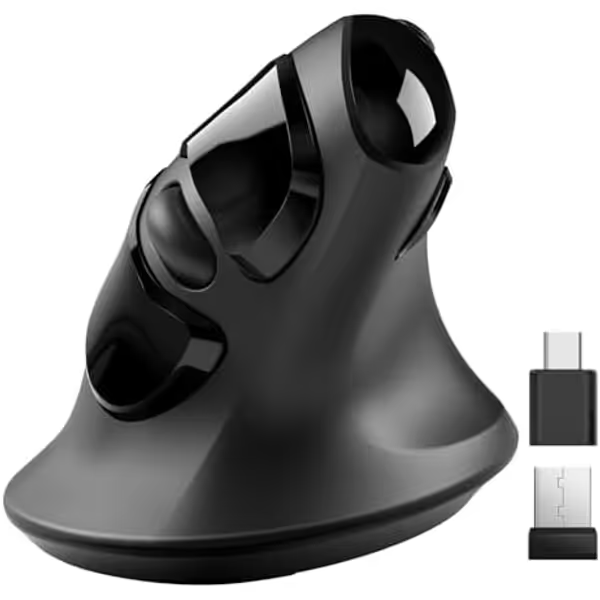
MicroPack Ergonomic Vertical Wireless Mouse
Ergonomic vertical design for reduced strain and comfortable control.
Design60° Vertical Ergonomic
Design60° Vertical Ergonomic
Pros
Reduces wrist and arm strain with natural handshake posture.
Quiet clicks ideal for shared or quiet environments.
Cons
Responsiveness issues reported on some surfaces.
Customers praise the ergonomic design for wrist pain relief and quiet clicks, though some note responsiveness issues.
Customers praise the ergonomic design for wrist pain relief and quiet clicks, though some note responsiveness issues.
The USB-A and USB-C receiver arrangement is its clearest practical strength. If you move between machines with different port types, that can remove an adapter from the chain. I favor hardware arrangements that lower software friction and make switching less ceremonial.
But the central decision is uncomplicated: MicroPack markets the MP-V03W for small-to-medium-sized hands. That makes it a poor match for a large-hand buying guide, regardless of its wireless design or claimed angle. Do not rationalize a size mismatch because the feature list is tidy.
Who it may suit instead
This is more plausibly a fit for someone with small-to-medium hands who wants a vertical wireless mouse, three straightforward DPI levels, and receiver compatibility across USB-A and USB-C-equipped computers. It is not the answer to a large-hand palm-support problem.
Build your control map after the fit test
Once the physical shape passes, keep the input plan modest. A vertical mouse should simplify repeated actions, not turn your thumb into a control panel.
For office and browser work
- Put Back and Forward where they are consistently reachable.
- Choose one DPI setting that lets you cross the screen without constant correction.
- Keep the scroll wheel as the anchor control; do not chase high DPI when clean scrolling is the real need.
For creative and technical work
- Use your most precise comfortable DPI setting for selection-heavy tasks.
- Verify that frequent drag operations do not make you squeeze the shell.
- Treat unverified side-button placement cautiously. A six-button count says little about whether the controls are usable with a large thumb.
For multi-machine habits
If you alternate between operating systems, preserve the purpose of controls even if the actual keyboard shortcuts differ. Back remains Back; precision remains precision; navigation remains navigation. That kind of system-mapping is what makes a new mouse disappear into the work rather than become another layout to remember.
FAQ
What is the best wireless mouse for people with big hands?
From the two models reviewed, the SHARE SUNSHINE is the only one marketed for big hands, so it is the appropriate candidate to try. The evidence does not provide dimensions or independent fit testing, however, so it cannot establish a universal best wireless mouse. Confirm comfortable palm support and thumb reach, and check the return policy before committing.
What is the best mouse for large palm grips?
Prioritize a fuller, curvier shell that gives the whole palm or back of the palm somewhere to rest. Large palm-grip users should also be able to reach the wheel, primary buttons, and side controls without stretching. Neither model here has independently documented palm-contact measurements, so fit testing remains essential.
Does a higher DPI setting mean better control for large hands?
Not necessarily. In one hands-on vertical-mouse comparison, pinky pinch, thumb-rest height, and the rear-shell curve were reported to matter more for everyday fit than raw DPI numbers. Start with the setting that lets you make accurate movements while keeping a relaxed grip, then adjust only if your screen setup demands it.
Final recommendation: buy the fit, not the label
For a comfortable grip for large hands, eliminate the MicroPack MP-V03W from contention: its own stated fit range is small to medium. Put the SHARE SUNSHINE model on a conditional shortlist because it is marketed for big hands and offers rechargeable wireless use, six buttons, and five DPI steps, but do not mistake that claim for verified geometry.
Your actionable next step is to measure nothing fancy and test everything that matters: choose the SHARE SUNSHINE only where the seller allows a straightforward return, then use the five-point fit audit in the first work session. If your palm rests, your thumb lands naturally, and your pinky stops working overtime, keep it. If not, return it quickly and continue the search for a larger, fuller vertical shell.
The right large-hand vertical mouse is the one that makes control feel inevitable. Reduce decisions, increase flow.
Related Articles
Best Mice for Small Hands: Lab-Tested Gaming Comfort
Learn the lab-verified sizing thresholds, weight sweet spots, and button ergonomics that make mice comfortable for small hands while preserving cross-platform flow. Get clear picks and setup tips - like the Zaopin Z2 Mini for gaming and the MX Anywhere 3S for hybrid work - and a simple process to map consistent shortcuts across devices.